Entry downtimes are used to model downtimes when a location needs to be serviced after processing a certain number of entities. For example, if a printer needs a new cartridge after printing 2000 shipping orders, an entry downtime should be defined. The downtime occurs after the entity that triggered the downtime leaves the location.
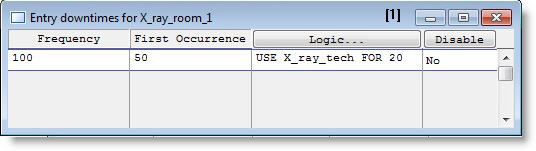
The Entry Downtime Editor consists of the edit table shown below. To access the Entry Downtime editor, select Entry from the menu that appears after clicking the DT... heading button. Entry downtimes are only available for single capacity locations. The Downtime Editor contains fields for defining downtimes based on the number of entries processed at a location. Most functions, including distributions, can be included in the Frequency and First Occurrence fields. (See Appendix to see if the specific statement or function is valid in a particular field.)
Frequency The number of entities to be processed between downtime occurrences. This may be a constant value or a numeric expression and is evaluated as the simulation progresses.
First Occurrence The number of entities to be processed before the first downtime. This may be a value or a numeric expression. If left blank, the first downtime will be based on the frequency entered.
Logic Any logic statements to execute when the downtime occurs. Normally, this logic is simply a time expression representing the length of the downtime. Click on the heading button to open a larger edit window.
Disable Select YES to temporarily disable the downtime without deleting it from the table.
In the example above, X-Ray Room 1 will be closed after every 100 patients. It will re-open after the X-Ray Technician spends 20 minutes cleaning, repairing or re-setting whatever needs to be serviced.
Please Note: Entry-based downtimes do not accumulate. For example, if a downtime cannot occur because the priorities of the entities being processed are at least 2 levels higher than the priority of the downtime, only the first downtime resumes after processing the entities. All others are ignored.

|
© 2012 ProModel Corporation • 556 East Technology Avenue • Orem, UT 84097 • Support: 888-776-6633 • www.promodel.com |